AI agent vs chatbot: difference, price, when to choose what
How an AI agent differs from a chatbot, how much each costs to implement, and how to choose for your business. A guide with examples and a comparison table.
Andrew Maryasov, AI consultant. 28 AI projects across 14 industries — from simple bots to multi-agent systems. This guide answers the question that comes up on discovery sessions more often than any other: “do we need a bot or an agent?”
TL;DR (in 30 seconds)
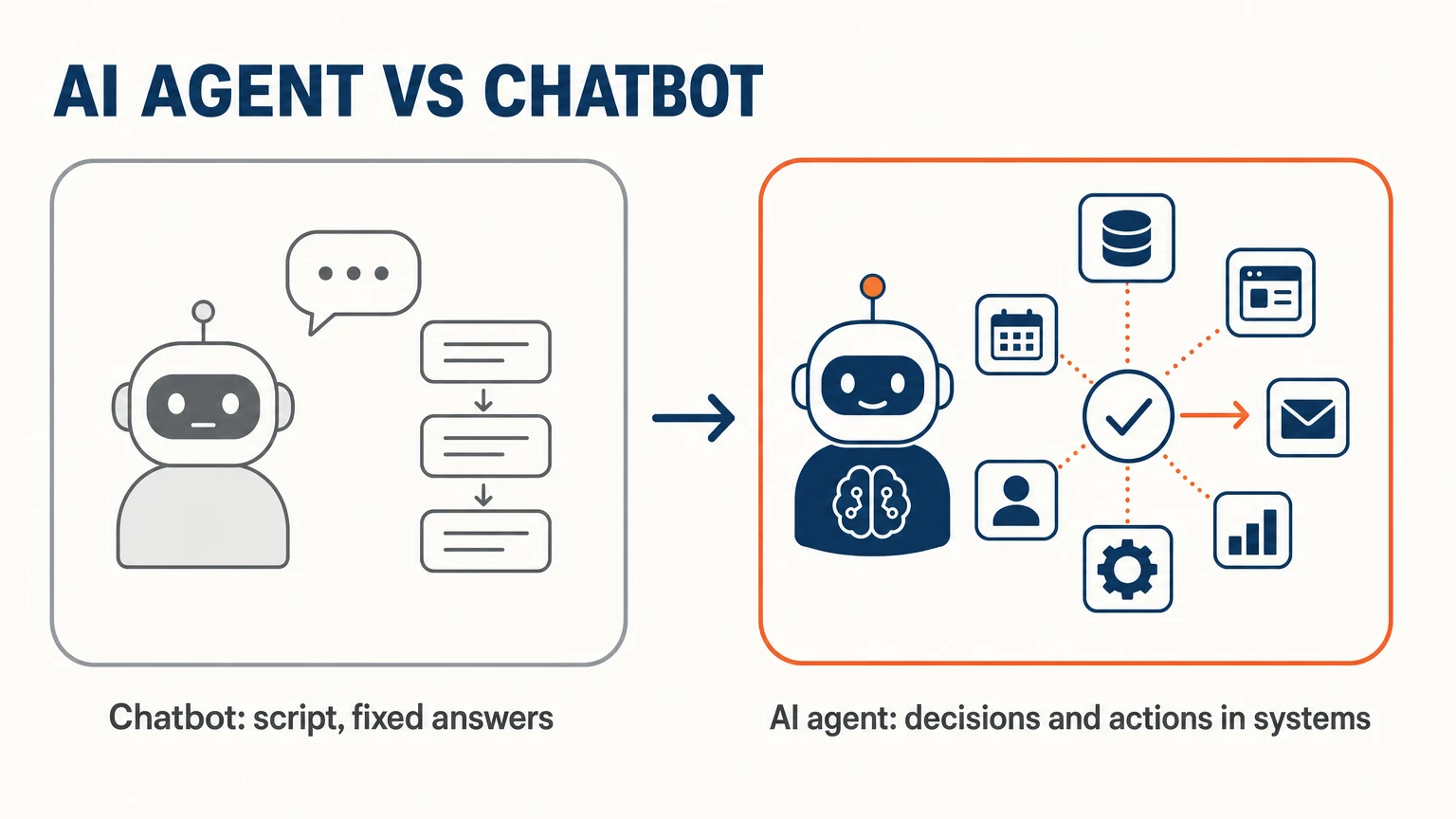
- A chatbot is a script. A limited set of rules, predictable answers. Cheap and fast (2–3 weeks), scales poorly.
- An AI agent is a system that makes decisions. It has tools, memory, plans. More expensive and slower (4–12 weeks): a Grow2.ai pilot starts at €1,800 (pricing), and it scales together with the business.
- Rule of thumb: if the number of scenarios is < 20 and they’re stable — chatbot. If > 20 or they change every month — agent.
What is a chatbot in 2026?
A chatbot is a program that answers messages by following a pre-defined script, and in 2026 it is built on one of three approaches.
Rule-based bots (ManyChat, BotHelp, Salebot, Chatfuel) work like an ATM: the user taps buttons, the bot performs an action. They are 100% predictable, cheap and fast, but any step outside the script ends in “didn’t understand”.
NLU-based bots (Dialogflow, Rasa, IBM Watson Assistant) classify the user’s intent and reply with the template tied to it — “question about price → answer A”. They tolerate variations in phrasing, but need hundreds of labeled examples, and every new intent means a new training cycle.
LLM wrappers (Voiceflow, custom GPTs, Bot9) are a current-generation large language model plus a system prompt: the user’s message goes in, a generated reply comes out. They look smart and are easy to tune to a tone of voice, but they have no tools — they cannot add a client to the CRM or check stock. Text only.
What is an AI agent?
An AI agent is an LLM with tools, memory and autonomous decision-making: it doesn’t just answer, it acts. Five components make that possible.
The brain is a large language model — Claude, GPT, Gemini — responsible for reasoning and choosing the next step.
Tools are the functions the agent can call, such as search_catalog(), book_appointment(), send_email() or query_crm(); they are the agent’s body.
Memory is what it keeps between messages: the short-term context of the current conversation, the long-term history of previous interactions in a vector database, and project knowledge about the product, pricing and FAQs.
Planning lets it break a complex request into steps — check stock, suggest an alternative, book a slot. And multi-step execution means it can run 5–10 actions in a row without a human: write, check, fix, send. Remove any one of the five and you are back to a chatbot with a nicer vocabulary.
Chatbot vs AI agent: what is the difference at a glance?
| Criterion | Chatbot | AI agent |
|---|---|---|
| Logic | Script | Decision-making |
| Tools | Limited (usually replies only) | API, databases, external services |
| Memory | Session only | Long-term + context |
| Conversation complexity | Linear | Branching, recovery |
| Implementation time | 2–3 weeks | 4–12 weeks |
| Implementation price | Off-the-shelf platform + setup | Pilot from €1,800 (Grow2.ai) |
| Monthly costs | Platform subscription | From €49/mo + tokens |
| Who it fits | FAQ, simple booking | Sales, support, complex flows |
| Scaling | Linear (more scenarios = more work) | Improves over time |
| Risks | ”I don’t understand” on deviations | Hallucinations, tool errors |
When should you choose a chatbot?
If your case meets all of these conditions:
- ☑ The number of unique scenarios is < 20.
- ☑ The scenarios are stable (don’t change every month).
- ☑ No need to integrate with more than 1–2 systems.
- ☑ A budget at the level of a platform subscription, not a project.
- ☑ MVP in 2–3 weeks.
Typical cases:
- Booking a haircut at a barbershop. Why an agent here — there are slots, services, and barbers. A clear script.
- FAQ for a small online store. “How much is delivery”, “what are your hours”, “do you accept exchanges” — the list is fixed.
- Lead capture on a landing page. Question → form → CRM. Straightforward.
When should you choose an AI agent?
If even one of these signs applies — you need an agent:
- ☑ More than 20 scenarios, or they change frequently.
- ☑ You need to make decisions (for example, product recommendations).
- ☑ Integration with 3+ systems (CRM, inventory, payment, email).
- ☑ Multi-step workflows (do reasoning → action → more reasoning).
- ☑ Persistence — the agent must remember previous interactions.
- ☑ Budget from €1,800 for a pilot and ROI on a 2–6 month horizon.
Typical cases:
- An AI stylist for a clothing store chain. Selecting products with the collection, season, and context in mind. Case study — upsells framed as a stylist’s advice, not “buy more”.
- A sales agent for B2B SaaS. Lead qualification, scheduling demos, answering technical questions, escalation to a human.
- Customer support for fintech. Checking transaction status in the database, refund processing, escalation on complex cases.
- An HR agent. Screening candidates, scheduling interviews, answering questions about the company.
What does each really cost? Two ROI models
Both calculations below are hypothetical: they show the logic, not measured results. The numbers are illustrative, so plug in your own.
A chatbot for a barbershop costs about $1,500: an off-the-shelf platform plus two weeks of setup. It saves roughly 10 hours a week of the administrator’s time, about $400 a month, so it pays back in around four months.
An AI agent for a clinic starts with a pilot — at Grow2.ai that is €1,800 for fourteen days (pricing), then from €49/mo plus tokens. The savings come from two places: less administrator time on routine, and bookings outside working hours that previously went to competitors. Monthly running costs depend on traffic — subscription, tokens, hosting, CRM extensions and monitoring. What the depth of working through such a task looks like is in the SmileClinic demo: there the calculation for a typical dental chain is laid out down to the hryvnia.
How do you choose? A decision tree
Question 1: How many unique conversation scenarios?
- < 20 → step 2
- 20+ → AI agent
Question 2: Do you need to integrate with more than one system (CRM, database, payments)?
- Yes → AI agent
- No → step 3
Question 3: Does the agent need to make decisions (recommendations, escalations, taking orders)?
- Yes → AI agent
- No → step 4
Question 4: What’s the budget?
- Below the price of an agent pilot (from €1,800) → chatbot
- From €1,800 → AI agent
What are the common mistakes?
Four mistakes come up again and again.
Buying a chatbot when you need an agent: “we’ll set up ManyChat, then add ChatGPT” doesn’t work, because a chatbot’s architecture cannot take on tools, memory or planning — a year later you rewrite it as an agent anyway, with the time lost.
Buying an agent when a chatbot is enough is the more common SMB mistake: “we want AI” turns into tens of thousands spent and six months of bug-fixing, when eight scenarios and simple booking could run on ManyChat for $50 a month.
Not counting LLM costs: in our e-commerce case the model cost came out at ≈€0.10 (≈$0.11) per dialogue, so 10,000 dialogues a month is about €1,000 — if a $50 chatbot covers the need, don’t overpay.
Not planning for human-in-the-loop: any agent makes mistakes in 2–5% of cases, and without escalation to a live manager those cases turn into lost clients and one-star reviews.
FAQ
How is an AI agent different from ChatGPT?
ChatGPT is an interface to an LLM. You write → it answers. Without tools (although custom GPTs changed this somewhat).
An AI agent is a system with an LLM inside. It has tools, integrations, memory, planning. ChatGPT can become part of an agent (as the brain), but on its own it isn’t an agent.
Will AI agents replace chatbots completely?
No. A simple FAQ bot for $50/mo will remain the optimal choice for many cases. An agent is overkill for linear scenarios.
My own forecast, as of September 2026: within two or three years the line will blur — most “chatbots” will have minimal agentic capabilities (one or two tools), and agents will become simpler to deploy (low-code platforms).
How much does it cost to maintain an AI agent?
Monthly — the subscription (from €49 at Grow2.ai) plus tokens, hosting, CRM extensions and monitoring. The main variable is dialogue volume: in our e-commerce case the model cost ≈€0.10 per dialogue.
Plus engineering support — at least 5–10 hours/month in the first 6 months (finetuning prompts, updating tools, debug).
Can you build an agent yourself without a developer?
Since 2026 — partly yes. Platforms like Voiceflow, Vapi, Botpress let you assemble agents from blocks. Good for a prototype.
But for production-ready with real CRM/database integration — you still need a developer or a consultant. Or, at minimum, someone with a technical background who understands APIs.
Are AI agents safe?
With the right approach — yes. Basic practices:
- Input validation: don’t trust the LLM output 100%, verify it.
- Tool permissions: the agent shouldn’t have access to anything it doesn’t need.
- Audit log: all of the agent’s actions go into the logs.
- Rate limiting: preventing abuse.
- Human-in-the-loop: for critical actions (payments, deleting data).
What’s next
If you want to discuss what fits your business — a 30-minute discovery session is free.
I advise personally; the delivery is run by my teams — Auspex (CRM) and Grow2.ai (AI agents). Discovery often ends with the recommendation “you don’t need AI right now — do X first.” That’s fine.
See also:
- How to hire an AI consultant: a 12-question checklist — if you are in fact looking for someone to do this end-to-end.
- AI consulting in Ukraine: when you need it and where to start — about the market, cases, budgets.
- SmileClinic demo — an AI pipeline for dentistry: a full proposal package in 6 minutes.

A letter on AI — 2–3 emails a month
Personal essays on how AI changes the way we think and work: what I tried myself, what worked and what didn't. At the end, links to the best of what I read.
No spam. Unsubscribe in one click.